Quick Answer
A habit tracker on iPhone wallpaper puts your streak directly on the lock screen — the surface you already glance at dozens of times a day — instead of inside an app you have to remember to open. Keep it to one to three habits, mark them with a simple row of dots, and update the image once a day. Because the tracker is impossible to avoid seeing, you're far less likely to quietly let the streak slide.
Why a Habit Tracker on iPhone Wallpaper Beats an App
Every habit-tracking app shares the same fatal flaw: it's a pull surface. It only works if you remember to open it — and the day you most need the nudge is the day you forget the app exists. A habit tracker on iPhone wallpaper flips that. The tracker lives on the screen you check first thing in the morning, in line at the store, and a hundred times in between, so the reminding happens whether you go looking for it or not. You're not relying on a notification you'll swipe away or an icon buried on page three. The streak is just there, in your peripheral vision, every time you pick up the phone.
A 2010 University College London study (Lally et al., European Journal of Social Psychology) following 96 people found a new habit took a median of 66 days to feel automatic — not the mythical 21. The practical upshot: your tracker has to survive about two months of friction, so marking it has to be nearly effortless.
That UCL figure reframes the whole job of a tracker. If a habit needs roughly two months of repetition before it runs on its own, the tracker's only real task is staying in front of you long enough to get there. Most people don't quit a habit because the habit is hard — they quit because the tracking fell off in week two and the streak stopped feeling real. A wallpaper tracker is engineered against exactly that: there's no app to abandon and nothing to remember to open.

What to Put on It (Keep It Stupidly Simple)
The most common mistake is treating the wallpaper like a spreadsheet. It isn't. You have a few square inches and a half-second glance — design for that.
- •
One to three habits, maximum. A tracker with twelve rows becomes wallpaper you stop seeing. Pick the two or three that actually matter this month.
- •
A row of dots or boxes, not numbers. ● ● ● ○ ○ ○ ○ reads instantly. '4/7' makes you do math. The brain rewards a visible chain far more than a fraction.
- •
Put it in the top third. The clock and date sit center-screen; your tracker should live where your thumb won't cover it and your eye lands first.
- •
Use the current month or week as the frame. Seeing the gaps in this week is motivating; an open-ended counter quietly loses meaning.
- •
Skip the labels you'll memorize. 'Gym · Read · Water' once is enough; after two days you'll know which row is which, so keep the text tiny and the dots big.
Build It in About 5 Minutes
Here's the no-frills version using tools already on your phone. You can graduate to a dedicated app later, but start by proving the idea works.
- 1
Open Notes
(or any canvas app) and type your one-to-three habit rows with a row of empty circles after each: 'Gym ○○○○○○○'.
- 2
Style it for a dark lock screen
— large text, light color on a plain dark background so it stays legible behind the clock.
- 3
Screenshot it
, then crop to your phone's screen dimensions so nothing important sits where the clock falls.
- 4
Set it as your lock-screen wallpaper:
Settings → Wallpaper → Add New Wallpaper → Photos, pick the screenshot, and place it.
- 5
Each night, fill one circle
per habit you completed, re-screenshot, and re-set the wallpaper. That nightly swap is the tracking ritual.
💡 Tip
Mark the dot at a fixed anchor, not 'whenever.' Tie the nightly update to something you already do — plugging in the charger, brushing your teeth — so the act of marking the tracker has its own trigger. A tracker you update 'when you remember' is a tracker you'll forget by Thursday.

The Part Where Most Trackers Die
Notice what the manual method asks of you every single night: edit the note, screenshot, crop, dig into Settings, re-set the wallpaper. That's five steps to color in one dot — and around day ten, the friction wins. The tracking dies not because you stopped doing the habits, but because re-making the image became its own little chore, the exact kind of effort a habit tracker is supposed to remove.
That's the gap NoteWall closes. You update your tracker text right in the app and it pushes the new wallpaper to your lock screen in about five seconds — no screenshot, no crop, no Settings detour. The five-step nightly ritual collapses into one. It's the same principle behind building habits with your phone and tracking goals on iPhone: the system only works if maintaining it costs almost nothing. Pair it with a workout reminder on your lock screen and the cue and the scorecard live on the same surface.
A habit tracker doesn't fail because the habit is too hard — it fails because updating the tracker got too annoying. Whatever method you choose, the nightly mark has to take seconds, not minutes.
Habit-Tracker Mistakes That Kill the Streak
- •
Tracking too many habits. Three is plenty. A crowded tracker turns into invisible wallpaper, and one missed row makes the whole thing feel failed.
- •
Chasing a perfect streak. Missing one day isn't a broken chain — it's one empty dot. The 'never miss twice' rule beats 'never miss once' because it survives real life.
- •
No fixed update time. A tracker you mark 'whenever' is a tracker you forget. Anchor the nightly mark to an existing habit.
- •
Making the dots too small to read. If you can't take it in at a glance, the lock-screen advantage is gone. Big marks, few rows.
- •
Treating setup as the work. A beautiful tracker you stop updating on day eight does nothing. The maintenance is the whole game — optimize for that, not for looks.
Frequently Asked Questions
How do I make a habit tracker on iPhone wallpaper?
Type one to three habits with a row of empty circles in Notes, screenshot it, and set it as your lock-screen wallpaper under Settings → Wallpaper. Fill in a circle each night and re-set the image. Apps like NoteWall skip the screenshot-and-crop step by pushing the updated tracker to your lock screen directly.
How many habits should I track at once?
One to three. Research on habit formation and plain experience both point the same way: stacking too many new behaviors at once spreads your attention thin and raises the odds you abandon all of them. Lock in one habit until it feels automatic — often around two months — then add the next.
Is a wallpaper tracker better than a habit-tracking app?
For visibility, yes — a wallpaper tracker is impossible to forget because it's on the screen you check constantly, while apps rely on you remembering to open them. Apps win on detailed stats and history. Many people use a wallpaper tracker as the daily cue and check an app only when they want the long-term data.
What if I miss a day on my tracker?
Leave the dot empty and keep going — one gap isn't a failure. The useful rule is 'never miss twice': a single missed day is normal life, but two in a row is the start of quitting. A visible empty dot on your lock screen is usually enough of a nudge to get you back on the next day.
Keep Reading: How to Build Habits With Your Phone · How to Track Goals on iPhone · Workout Reminder on Lock Screen · Goal Tracking on iPhone — Pillar Guide
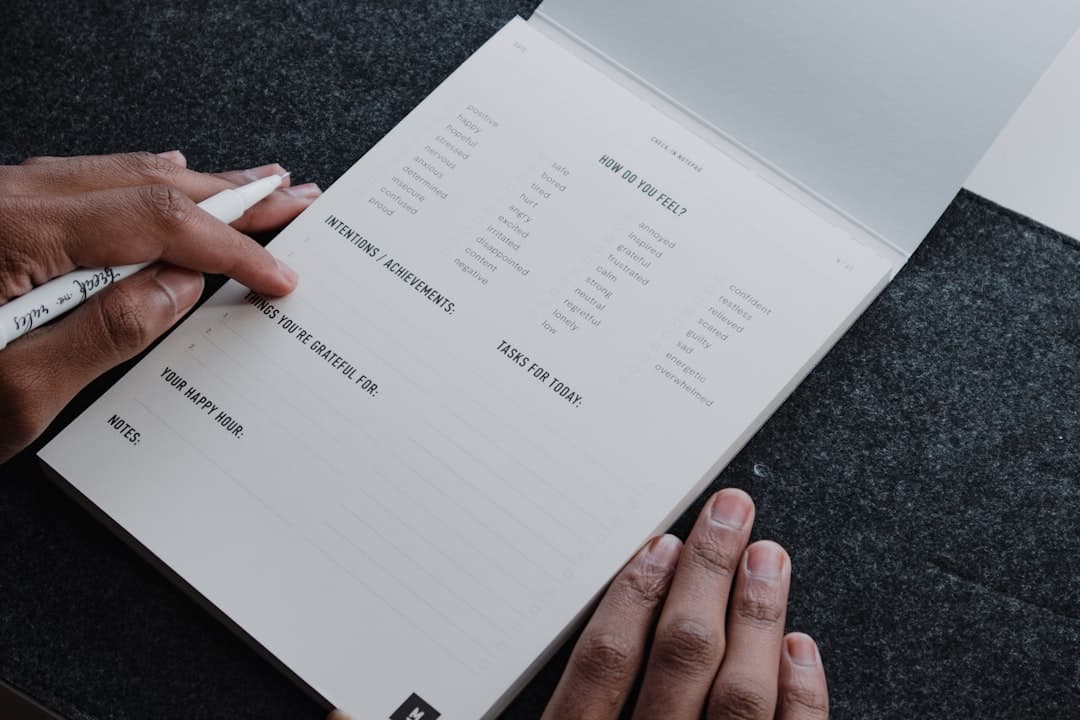
Photos by Nubelson Fernandes, Swello, and Bagus Hernawan on Unsplash.
Mark the Dot in One Tap, Not Five Steps
The screenshot-crop-Settings ritual is what kills most wallpaper trackers by day ten. NoteWall updates your habit tracker and pushes it to your lock screen in about five seconds — so the only thing left to maintain is the habit itself.
Download NoteWall Free
Founder of NoteWall. Building tools that turn your lock screen into a productivity system. About →
You might also like
Best Habit Tracker App for iPhone 2026: 7 Compared
Looking for the best habit tracker app for iPhone in 2026? We compare 7 — from free and minimalist to gamified — so you pick the one you'll actually keep using.
Gratitude Journal on iPhone Lock Screen: A One-Sentence Habit
A gratitude journal on your iPhone lock screen makes the habit small enough to actually keep. Here's how to set it up so it lasts past week three.
Unlock Productivity: How to Put Notes on Your iPhone Lock Screen
Want to see your notes, reminders, and goals every time you glance at your iPhone? Learn how to put notes on your iPhone lock screen for maximum productivity!